
The Best Wpa3 Routers: Buyer's Guide in 2026
Abiodun Ayomide Apr 2, 2026 7:13 AM
Introducing the Best WPA3 Routers: Buyers Guide in 2026, your go-to resource for all things related to securing your internet connection. In today's digital age, having a reliable and secure router is essential to protect your personal information and ensure a smooth online experience. With the ever-evolving technology landscape, it's crucial to stay up-to-date with the latest advancements in router security. That's where the best WPA3 routers come in. Designed to provide enhanced encryption and robust security features, these routers offer peace of mind and superior performance. Whether you're a tech enthusiast, a small business owner, or simply someone who values online privacy, our comprehensive buyers guide will help you make an informed decision when choosing the best WPA3 router for your needs. So, let's dive into the world of cutting-edge router technology and discover the top contenders in the market.
Top Rated

Source: Amazon
Best WiFi Performance: TP-Link AX5400 WiFi 6 Router (Archer AX72 Pro)
Pros:
-
High-Speed Dual-Band WiFi 6
-
2.5 Gbps Ethernet Port
-
Extensive Coverage with 6 Antennas
-
Advanced Network Security Features
Cons:
-
No USB 3.0 Port
The TP-Link Archer AX72 Pro delivers impressive wireless performance with its Dual-Band AX5400 WiFi 6 capability, reaching speeds up to 4804 Mbps on the 5GHz band. Its 2.5 Gbps Ethernet port supports high-speed wired connections, making it suitable for demanding tasks like 8K streaming and gaming. Six high-performance antennas combined with Beamforming technology ensure wide coverage and focused signals throughout the home. Enhanced by MU-MIMO and OFDMA, this router efficiently handles multiple devices simultaneously. Additional benefits include built-in VPN support for secure remote access, TP-Link HomeShield security suite for comprehensive network protection, and compatibility with voice assistants like Alexa and Google Assistant. The router works seamlessly with all major internet providers, requiring only a modem for setup.
Users generally appreciate the strong WiFi coverage and fast connection speeds, highlighting stable performance during gaming and streaming sessions. The ease of remote management and integrated security features receive positive feedback. Some users note that while the router supports USB connectivity, it lacks a USB 3.0 port, which limits faster file sharing capabilities. Overall, the Archer AX72 Pro is regarded as a reliable and powerful option for home networks with multiple high-demand devices.
Best Multi-Gig Connectivity: TP-Link AX3000 WiFi 6 Router (Archer AX55 Pro)
Pros:
-
Dual 2.5 Gbps Multi-Gig Ports
-
WiFi 6 with 160 MHz Channel Support
-
Mesh Network Compatibility (EasyMesh)
-
Comprehensive HomeShield Security
Cons:
-
Limited Number of Antennas
The TP-Link Archer AX55 Pro stands out with its dual 2.5 Gbps multi-gigabit ports, delivering fast wired connections ideal for bandwidth-intensive tasks. It supports Dual-Band AX3000 WiFi 6 with speeds up to 2402 Mbps on the 5GHz band, ensuring smooth 8K streaming and low-latency gaming. Four high-performance antennas with Beamforming technology provide solid wireless coverage, while MU-MIMO and OFDMA improve network efficiency and support multiple simultaneous connections. The router includes VPN client and server support for secure remote access, alongside TP-Link HomeShield for enhanced network security and parental controls. Its EasyMesh compatibility allows seamless expansion into a mesh network for broader, unified coverage.
Users report reliable and fast wireless performance, appreciating the ease of setup and mesh networking capability for large homes. The multi-gigabit ports receive positive feedback for improving wired network speed. Some mention that the coverage could be stronger in very large or complex layouts due to fewer antennas compared to higher-end models. Overall, the Archer AX55 Pro is regarded as a powerful, versatile option for gamers and smart homes looking for advanced connectivity features.
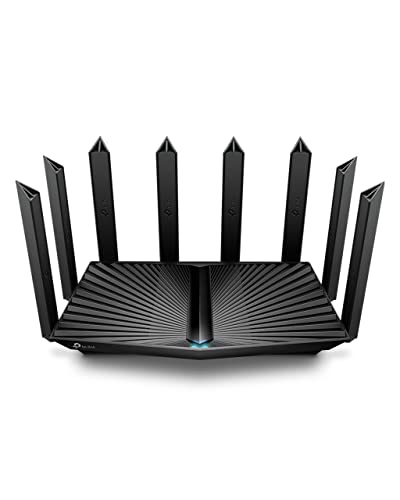
Best Tri-Band WiFi 6E: TP-Link AXE5400 Tri-Band WiFi 6E Router (Archer AXE75)
Pros:
-
Ultra-Fast Tri-Band WiFi 6E
-
1.7 GHz Quad-Core CPU with 512 MB RAM
-
True Tri-Band with OFDMA for Device Capacity
-
Comprehensive HomeShield Security Suite
Cons:
-
Higher Price Point
The TP-Link Archer AXE75 delivers cutting-edge performance with its Tri-Band WiFi 6E technology, offering combined speeds up to 5400 Mbps across 6 GHz, 5 GHz, and 2.4 GHz bands. The addition of the 6 GHz band provides greater bandwidth and ultra-low latency, ideal for responsive gaming, seamless video calls, and high-quality streaming. Powered by a 1.7 GHz quad-core processor and 512 MB of RAM, this router manages multiple devices efficiently, supported by OFDMA technology that enhances simultaneous data transmission. It supports OneMesh for easy network expansion and includes VPN client/server capabilities for secure remote access. TP-Link’s HomeShield security suite provides robust network protection and parental controls, enhancing overall safety and control.
Users praise the Archer AXE75 for its blazing-fast speeds and smooth handling of multiple high-demand devices. The new 6 GHz band significantly reduces latency and congestion, which is especially appreciated in gaming environments. Some users find the higher price justified by the advanced features but suggest evaluating needs carefully before investing. Overall, this router is highly regarded for future-proofing home networks with advanced WiFi 6E capabilities.
Best Balanced Coverage: H3C AX5400 WiFi 6 Router for Wireless Internet(NX54)
Pros:
-
High-Speed WiFi 6 up to 4804 Mbps
-
Six High-Gain External Antennas
-
Advanced Lifetime Parental Controls
-
Robust Built-In Network Security
Cons:
-
No Built-In Modem
The H3C NX54 delivers powerful and stable WiFi 6 performance with speeds up to 4804 Mbps on the 5 GHz band, leveraging 4K QAM modulation and a 160 MHz channel for smooth 4K/8K streaming, gaming, and video conferencing. Its 4T4R antenna design paired with six high-gain external antennas ensures wide, balanced coverage throughout the home, capable of supporting numerous devices simultaneously. True MU-MIMO and a dedicated NPU enhance multi-device connectivity by efficiently managing data streams to minimize lag. The router offers advanced parental controls without subscription fees, including scheduling, usage monitoring, and content filtering, providing ongoing management of online safety. Network security is strengthened with WPA3 encryption, IPv6, VPN support, and isolated guest WiFi for enhanced protection. Setup is streamlined via a mobile app, making it accessible for users without technical expertise.
Users appreciate the strong and consistent WiFi coverage, noting the router’s ability to handle multiple devices without performance drops. The comprehensive parental controls receive positive feedback for ease of use and flexibility. Some mention the need to connect this router to a separate modem as a minor inconvenience. Overall, the H3C NX54 is viewed as a reliable choice for households seeking a secure, high-performance WiFi 6 solution with extensive coverage and user-friendly management.
Best Mesh Flexibility: WAVLINK AX6000 Dual Band WiFi 6 Router
Pros:
-
AX6000 Dual-Band WiFi 6 Speeds
-
8 High-Gain Omni-Directional Antennas
-
Seamless Whole-Home Mesh Network
-
Advanced VPN and Encryption Support
Cons:
-
Mesh Compatibility Limited to WAVLINK Devices
The WAVLINK WN536AX6-B router offers robust AX6000 WiFi 6 performance, delivering up to 4804 Mbps on the 5 GHz band and 1148 Mbps on the 2.4 GHz band. With eight 5dBi omni-directional antennas and beamforming technology, it ensures wide and reliable coverage up to approximately 1,700 square feet. The router supports OFDMA and 4x4 MU-MIMO, optimizing simultaneous connections for over 32 devices without congestion. Its whole-home mesh capability allows effortless expansion by adding WAVLINK-compatible extenders, providing a unified WiFi network that eliminates signal drops and seamless roaming. Security is strengthened through support for multiple VPN protocols and WPA2/WPA3 encryption standards, safeguarding user data. Setup and management are simplified via the WavRouter app or web interface, providing easy access to parental controls and QoS settings.
Users commend the router for its strong coverage and stable connectivity, particularly appreciating the mesh network’s ability to maintain seamless WiFi throughout larger homes. The variety of security features and VPN support are seen as significant advantages. However, some note that mesh functionality is restricted to WAVLINK devices, limiting compatibility with third-party mesh products. Overall, the WN536AX6-B is a solid choice for those seeking flexible, high-performance WiFi 6 networking with expandable mesh options within the WAVLINK ecosystem.


- 9.3
- BrandH3C

- 9.2
- BrandWAVLINK
- 8.9
- BrandTP-Link

- 8.8
- BrandCudy
- Prime

- 8.7
- BrandReyee

- 8.6
- BrandTenda
- Prime
- 8.5
- BrandASUS
Last update on 2026-04-02 / Affiliate links / Images, Product Titles, and Product Highlights from Amazon Product Advertising API
There are several routers available in the market that support WPA3 (Wi-Fi Protected Access 3) security protocol. Some popular routers that use WPA3 include:
1. ASUS RT-AX88U: This high-performance router supports WPA3 encryption to ensure secure Wi-Fi connections.
2. TP-Link Archer AX6000: This advanced router offers WPA3 encryption for enhanced security and protection against unauthorized access.
3. NETGEAR Nighthawk AX8: With support for WPA3, this router provides secure Wi-Fi connectivity for your home or office network.
4. Linksys MR8300: This tri-band router incorporates WPA3 encryption to safeguard your wireless connections.
5. Google Nest Wifi: Google's mesh Wi-Fi system supports WPA3 security, providing a secure and reliable wireless network.
Please note that the availability of WPA3 support may vary depending on the specific model and firmware version of the router. It is always recommended to check the product specifications or consult the manufacturer's website for the most up-to-date information.
Should I get a WPA3 router?
Yes, getting a WPA3 router is definitely worth considering. WPA3 (Wi-Fi Protected Access 3) is the latest security protocol for wireless networks, providing enhanced protection against unauthorized access and securing your personal data.Here are a few reasons why you should consider getting a WPA3 router:
1. Improved Security: WPA3 offers stronger encryption algorithms, making it more difficult for hackers to crack the Wi-Fi password and gain access to your network. This ensures that your sensitive information, such as passwords and financial details, remains safe.
2. Enhanced Password Protection: WPA3 introduces a new feature called Simultaneous Authentication of Equals (SAE), also known as Dragonfly Key Exchange. This makes it more challenging for attackers to guess or crack your Wi-Fi password, as it protects against offline dictionary attacks.
3. Individualized Data Encryption: WPA3 provides individualized data encryption for each device connected to the network, preventing unauthorized users from intercepting and accessing data transmitted between devices. This helps to safeguard your privacy and maintain the confidentiality of your online activities.
4. Better Defense Against Brute-Force Attacks: WPA3 routers come with stronger defenses against brute-force attacks, where hackers attempt to gain access by trying numerous password combinations. It includes a feature that locks out devices after a certain number of unsuccessful login attempts, making it significantly harder for attackers to gain unauthorized access.
While WPA2 routers still offer a reasonable level of security, upgrading to a WPA3 router can provide you with an extra layer of protection against evolving cyber threats. However, it is important to note that all devices on your network need to support WPA3 in order to fully benefit from its security features.
Ultimately, the decision to get a WPA3 router depends on your specific security needs and the devices you use. If you value strong security and want to ensure the utmost protection for your network and personal data, investing in a WPA3 router is a wise choice.
Is WPA3 the best Wi-Fi security?
WPA3 is considered to be the most advanced and secure Wi-Fi security protocol currently available. It addresses the vulnerabilities of its predecessor, WPA2, by introducing stronger encryption and authentication methods. WPA3 utilizes individualized data encryption, making it harder for attackers to intercept and decrypt wireless communications. It also enhances protection against brute-force attacks and improves security for devices with weaker passwords. While no security protocol is entirely foolproof, WPA3 represents a significant step forward in securing Wi-Fi networks.
Can I get WPA3 on my router?
Yes, it is possible to get WPA3 on your router. WPA3 is the latest security protocol for Wi-Fi networks, offering stronger encryption and improved protection against security vulnerabilities. To determine if your router supports WPA3, you can check the manufacturer's website or the router's user manual. If your router is relatively new, there is a good chance that it supports WPA3. However, if your router does not support WPA3, you might consider upgrading to a newer model that does.
Read More:
Selecting the best WPA3 routers ensures enhanced network security and future-proof performance in today’s connected environments. These routers not only provide stronger encryption but also support faster speeds and improved reliability for all your devices. When choosing the right WPA3 router, consider factors such as coverage, device compatibility, and advanced features tailored to your specific needs. Investing in a quality WPA3 router is essential for protecting your data and maintaining a seamless online experience in an increasingly digital world.

Abiodun Ayomide
Abiodun Ayomide is a master in economics, she has many years of experience in a Marketing position, She always has in-depth assessments on every aspect of products that customers care about. In her free time, she often listens to music and sips tea.










- How to Clean Your Air Conditioner So It Runs Like New All Summer
- Sainlogic SA7 Review: The Best WIFI Smart Weather Station
- Cheap Robot Vacuum and Mop Options for Efficient Home Cleaning
- How to choose a robot vacuum for pet hair
- Ultimate Guide: How to Protect Your Outdoor Security Cameras from Hacks and Vandalism
- How to Maximize Cooling Efficiency with the Best Portable Air Conditioner
- How To Maintain And Clean Your Cooling Fan For Longevity
- How to Fix Smart Switch Won't Connect to Device
- The best smart Wi-Fi router for home
- Guide to cleaning washing machines at home