
The 10 Best Wifi Sim Router Review For 2026
Mike Kim Apr 7, 2026 5:09 AM
Looking for the ultimate solution for on-the-go connectivity? A WiFi SIM router might be just what you need! Whether you're traveling, working remotely, or simply need a backup internet option, a WiFi SIM router offers flexibility and convenience. In this guide, we'll explore some of the best WiFi SIM routers available, helping you stay connected anytime, anywhere. Let's get started!
Top Picks

Source: Amazon
Best Multi-WAN: GL.iNet GL-X3000 (Spitz AX) Cellular Gateway 5G Router
Pros
-
High Wi-Fi 6 throughput
-
Strong 5G performance
-
Flexible dual-SIM setup
-
OpenWrt customization
Cons
-
Premium price
The GL.iNet Spitz AX (GL-X3000) positions itself as a capable cellular router for users who need stable connectivity across multiple environments. Its Wi-Fi 6 speeds provide solid throughput for both mobile workstations and small business setups, while the 5G capability extends coverage into areas where wired connections are limited. The dual-SIM support adds a layer of reliability, letting users switch or fail over to the stronger signal without manual intervention. Built on OpenWrt, the router also appeals to users who want deeper control over network behavior, plug-ins, and security. With support for OpenVPN and WireGuard, it delivers encrypted connections suitable for remote access and business-critical communication.
User impressions often highlight its dependable cellular performance in RVs and remote locations, noting that connection stability improves noticeably with the detachable antennas. Many appreciate the straightforward setup and the flexibility of OpenWrt, especially those who prefer fine-tuning their network. Some mention that its price sits higher than typical travel routers, but the combination of speed, multi-WAN features, and customization tends to justify the investment for heavy-duty users.
Best Portable 5G: GL.iNet GL-XE3000 (Puli AX) 5G Router
Pros
-
Built-in battery backup
-
Strong 5G performance
-
Dual-SIM flexibility
-
Multi-WAN options
Cons
-
Slightly bulky design
The GL.iNet Puli AX (GL-XE3000) stands out as a portable Wi-Fi 6 cellular router designed for business continuity, remote work, and travel. Its combination of 5G support, dual-SIM capability, and multi-WAN options provides stable connectivity across varied environments. The built-in 6400mAh battery is a defining feature, offering up to eight hours of backup power to keep operations online during outages or field deployments. Wi-Fi 6 speeds and MU-MIMO technology accommodate multiple devices simultaneously, while the inclusion of OpenVPN and WireGuard supports secure access for professionals who rely on encrypted communication.
Users often praise the router’s reliability during power disruptions and its ability to maintain strong signals in remote worksites, RVs, and temporary office setups. Many appreciate the versatility of Ethernet, cellular, and tethering options, noting that failover works smoothly when switching between connections. The detachable antennas receive positive feedback for improving long-range stability. A few users mention that its size is larger than typical travel routers, but most agree the performance and battery capacity outweigh the added bulk.
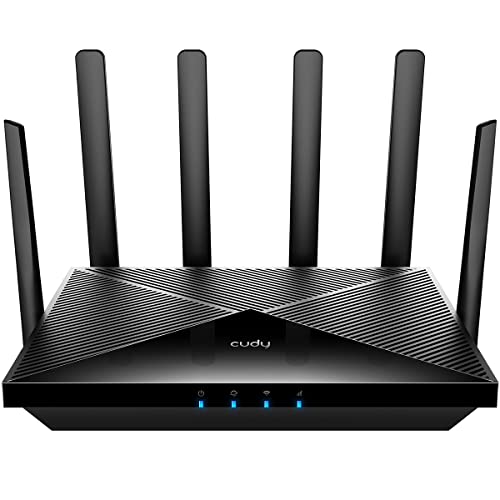
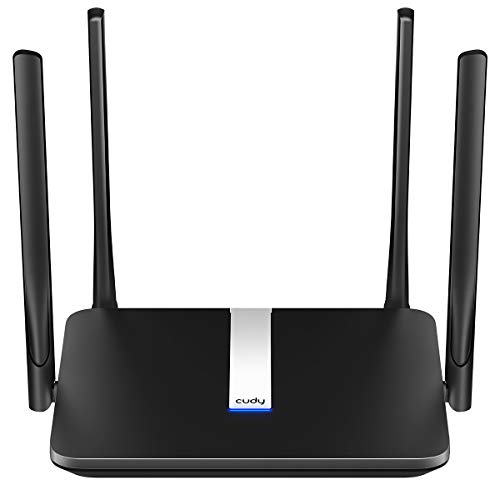
Best Cat 6 LTE: Cudy New 4G LTE Cat 6 WiFi Router, Qualcomm Chipset
Pros
-
Fast LTE-A speeds
-
Dual-SIM redundancy
-
Detachable antennas
-
Broad VPN support
Cons
-
Limited to 4G networks
The Cudy LT700 focuses on delivering dependable LTE Cat 6 performance for homes, small offices, and outdoor setups where wired service may be unavailable. Its 4x4 MIMO design enhances signal strength and expands coverage, making it useful in areas with inconsistent cellular reception. The detachable antenna system adds flexibility, allowing users to switch to stronger outdoor antennas when needed. Dual-SIM support and WAN failover help maintain continuous connectivity, while the router’s support for multiple VPN protocols offers secure remote access for surveillance systems and remote work.
Users frequently highlight its stable speeds and improved signal quality when paired with upgraded antennas. Many appreciate the ease of setup and the router’s ability to keep networks running when one SIM or WAN link fails. The broad VPN compatibility receives positive feedback from those using remote cameras or traveling between locations. Some users note that the lack of 5G support limits future-proofing, but most find the performance more than adequate for 4G-focused deployments.
Best LTE Cat 12: GL-X2000(Spitz Plus) Cellular Gateway 4G LTE Router
Pros
-
Strong Wi-Fi 6 speeds
-
Dual-SIM failover
-
Multi-WAN flexibility
-
External antenna support
Cons
-
Modem limitations in restricted regions
The GL.iNet Spitz Plus (GL-X2000) is designed for users who need stable cellular connectivity paired with fast Wi-Fi 6 performance. Its 4G LTE Cat 12 modem uses three-carrier aggregation to improve speed and coverage, making it suitable for homes, small offices, and locations where wired service is limited. Dual-SIM support adds an extra layer of reliability, and the router’s multi-WAN capabilities allow seamless switching or load balancing across Ethernet, cellular, tethering, and repeater modes. With multiple SMA connectors, users can enhance performance further by attaching external antennas tailored to their environment. VPN support through OpenVPN and WireGuard ensures encrypted access for business and remote work.
Feedback often highlights the router’s stable speeds, especially when paired with upgraded antennas, and users appreciate the flexibility of its failover and load-balancing features. Many note that setup remains straightforward despite the advanced configuration options available through the interface. The ability to maintain dependable connectivity across different providers earns consistent praise, though a handful of users mention that modem restrictions in certain regions may limit functionality.
Best Outdoor LTE: Cudy Unlocked Outdoor 4G LTE Cat 4 Modem Router
Pros
-
IP65 weatherproof design
-
Detachable antennas
-
AC1200 dual-band Wi-Fi
-
Passive PoE support
Cons
-
Limited Cat 4 speeds
The Cudy LT500 Outdoor targets locations where wired service is unavailable, offering a straightforward way to convert LTE Cat 4 signals into dual-band AC1200 Wi-Fi. Its detachable SMA antennas improve signal sensitivity and allow upgrades to higher-gain outdoor antennas when needed. The IP65 housing and 4KV lightning protection make it suitable for farms, cabins, yards, and RV installations, while passive PoE simplifies deployment by combining power and data through a single cable. Once a SIM card is inserted, the router provides a stable connection for streaming, gaming, or camera monitoring, and the interface remains simple for managing devices and DNS encryption.
User experiences often highlight its reliable outdoor performance and strong signal stability when paired with external antennas. Many appreciate the ease of setup and the ability to mount it in flexible locations without worrying about weather exposure. The passive PoE option receives praise from users deploying it in barns or garages where power access is limited. Some note that Cat 4 speeds are modest compared with newer LTE categories, but most find it sufficient for remote security cameras, casual streaming, and general household connectivity.



- 9.4
- BrandGL.iNet

- 9.3
- BrandCudy
- Prime

- 9.2
- BrandCudy
- 8.5
- BrandDionlink

- 8.3
- BrandFIRSTNUM
Last update on 2026-04-07 / Affiliate links / Images, Product Titles, and Product Highlights from Amazon Product Advertising API
SIM card routers can be very beneficial depending on your specific needs and circumstances. Here are some reasons why SIM card routers can be a good choice:
Mobility: SIM card routers allow you to access the internet using cellular data networks, providing internet connectivity wherever there is cellular coverage. This makes them ideal for use in remote locations, temporary setups, or situations where traditional wired internet connections are unavailable.
Backup Connectivity: SIM card routers can serve as a reliable backup internet connection in case your primary internet service provider (ISP) experiences outages or disruptions. This redundancy ensures continuous connectivity, especially critical for businesses and individuals who rely on internet access for work or communication.
Flexibility: SIM card routers offer flexibility in choosing your internet service provider and data plan. You can easily switch between different cellular carriers or plans to find the best coverage and pricing options for your needs, without being tied to a specific ISP or location.
Easy Installation: SIM card routers typically have simple installation processes, requiring minimal setup and configuration. They can be quickly deployed and activated, making them suitable for temporary setups, events, or situations where immediate internet access is required.
Cost-Effectiveness: Depending on your usage patterns and data requirements, SIM card routers can be a cost-effective solution compared to traditional wired internet connections, especially in situations where installing fixed-line infrastructure is impractical or expensive.
However, it's essential to consider some potential drawbacks of SIM card routers, such as reliance on cellular coverage, potential data limitations or overage charges, and variable speeds depending on network congestion and signal strength. Additionally, not all areas may have reliable or high-speed cellular coverage, so it's crucial to research and evaluate the availability and quality of cellular networks in your area before opting for a SIM card router. Overall, SIM card routers can be an excellent option for providing reliable and flexible internet connectivity in various situations, but it's essential to assess your specific needs and circumstances to determine if they are the right choice for you.
Can I use SIM in WiFi router?
Yes, you can use a SIM card in a WiFi router that supports cellular connectivity. These routers are commonly referred to as "SIM card routers" or "4G LTE routers." They allow you to insert a SIM card from a cellular carrier to access the internet using the cellular data network.
Using a SIM card in a WiFi router offers several benefits:
Wireless Internet Access: With a SIM card inserted, the WiFi router can connect to the internet via the cellular data network, providing wireless internet access to devices connected to the router.
Mobility: Since SIM card routers utilize cellular networks, they provide internet connectivity wherever there is cellular coverage. This makes them ideal for use in remote locations, temporary setups, or situations where traditional wired internet connections are unavailable.
Backup Connectivity: SIM card routers can serve as a backup internet connection in case your primary internet service provider (ISP) experiences outages or disruptions. This redundancy ensures continuous connectivity, especially critical for businesses and individuals who rely on internet access for work or communication.
Flexibility: SIM card routers offer flexibility in choosing your internet service provider and data plan. You can easily switch between different cellular carriers or plans to find the best coverage and pricing options for your needs, without being tied to a specific ISP or location.
Easy Installation: SIM card routers typically have simple installation processes, requiring minimal setup and configuration. They can be quickly deployed and activated, making them suitable for temporary setups, events, or situations where immediate internet access is required.
Overall, using a SIM card in a WiFi router is a convenient and versatile way to access the internet, providing reliable connectivity in various situations and environments.
Is SIM router better than mobile hotspot?
Whether a SIM router or a mobile hotspot is better depends on your specific needs and circumstances. Here's a comparison to help you decide:
SIM Router:
Connectivity for Multiple Devices: A SIM router allows multiple devices to connect to the internet simultaneously, making it suitable for households, small businesses, or situations where multiple users need internet access.
Stability and Reliability: SIM routers are designed for continuous use and can provide a stable and reliable internet connection, especially in areas with good cellular coverage.
Extended Coverage: SIM routers often have better antennas and signal reception capabilities compared to mobile hotspots, resulting in extended coverage and better performance in remote or low-signal areas.
Integration with Home or Office Networks: SIM routers can be integrated into existing home or office networks, allowing seamless connectivity and centralized management of internet access.
Fixed Installation: SIM routers are typically installed in a fixed location, providing consistent internet access without the need to carry a separate device.
Mobile Hotspot:
Portability: Mobile hotspots are small, portable devices that can be carried with you wherever you go, providing internet access on the go. They are ideal for travelers, remote workers, or individuals who need internet access while away from home.
Instant Setup: Mobile hotspots can be set up quickly and easily, requiring no installation or configuration. Simply turn on the device, connect your devices to the hotspot's WiFi network, and you're ready to go.
Personalized Connectivity: Mobile hotspots allow you to create your own secure WiFi network, providing internet access to your devices without having to rely on public WiFi networks, which may be unsecured or unreliable.
Limited Connectivity: Mobile hotspots typically support a limited number of connected devices, usually between 5 to 10 devices, depending on the device model and cellular carrier.
Battery Life: Mobile hotspots are powered by internal batteries, which may have limited battery life depending on usage. It's essential to monitor battery levels and recharge the device as needed, especially during extended use.
In summary, SIM routers are better suited for situations where multiple devices require continuous and stable internet access in a fixed location, while mobile hotspots are more suitable for individuals or small groups needing portable internet access while on the go. Ultimately, the choice between a SIM router and a mobile hotspot depends on your specific usage requirements, mobility needs, and preferences.
Read More:
10 The Best Single Band Router Reviews for 2026 | SHR
The Best Mesh Wifi - Best Reviews 2026
Choosing the best wifi sim router ultimately comes down to balancing performance, coverage, and reliability in the environments where you plan to use it. After comparing real-world speeds, network stability, and ease of setup across various models, it’s clear that not all SIM-based routers deliver the same level of consistency. The strongest options are those that pair robust LTE or 5G support with smart antenna design, practical software features, and durable build quality.
If you prioritize fast mobile connectivity, dependable failover, or an all-in-one solution for travel and remote work, a well-designed SIM router can outperform many traditional hotspots. The key is matching its capabilities to your actual usage patterns. With that approach, you can select a model that provides stable connections, flexible deployment, and long-term value without overpaying for features you won’t use.

Mike Kim
Mike Kim is a person who likes peaceful surroundings, she loves picnics in the suburbs. She has many years of experience as a home technology product developer. She will help you understand more about the products as well as the most in-depth reviews.











- How to Clean Your Air Conditioner So It Runs Like New All Summer
- Sainlogic SA7 Review: The Best WIFI Smart Weather Station
- Cheap Robot Vacuum and Mop Options for Efficient Home Cleaning
- How to choose a robot vacuum for pet hair
- Ultimate Guide: How to Protect Your Outdoor Security Cameras from Hacks and Vandalism
- How to Maximize Cooling Efficiency with the Best Portable Air Conditioner
- How To Maintain And Clean Your Cooling Fan For Longevity
- How to Fix Smart Switch Won't Connect to Device
- The best smart Wi-Fi router for home
- Guide to cleaning washing machines at home